How to Play
Item Storage
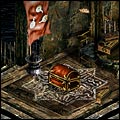
- Storage
- Storage is an extra slot of item safekeeping. You will find a Storage that displayed by red chest at some towns, and you can put your 10 items to the slot. Note if you lost any items for this function, we will not support for any reasons.
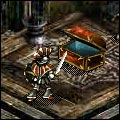
- Storage Screen
- You can find Storage that displayed by red chest at some large towns. To access, you must first bring up the storage menu by clicking on that chest. Then you will find the storage menu with the item list. If you are playing on Standard, the chest will not be opened.
- Deposit Item
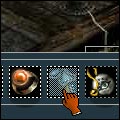
- To deposit items you have to Storage, right-click an item in the inventory as you remove your item when the storage screen is opening. After an item turns to blue color, right-click again. You can not move Puppet classes, Joke items, Splendid items, and the items displayed "Cannot be Saved".
- Withdraw Item
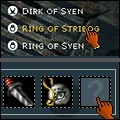
- To withdraw an item from Storage, left-click the item name in the storage screen. You can see that item attribute at Treasure Viwer. To take out that item, simply left-click on the item. This action is same as you get an item from the chest.
- Warnings!
- When you use Storage, wait until an item is finished to move (appear) in Storage or your inventory for prevent your item disappear. Do not do any other actions until finish. If you got "Server is Busy" message when you are using Storage, wait for a while and try again. Don't forget if you lost your items for any reasons, we cannot get back it to you.